I am running Windows 7 64-bit Professional, and have two user accounts on my computer. Problem is that the login screen only shows the last logged in user and an “Other User” icon which allows you to input username manually. Is there any way of reverting to showing a list of all the users instead?
If you have multiple user accounts in Windows 8, 7 or Vista, you may notice a new annoyance – The login screen only displays the last logged-on user and a blank image with the label “Other User”. When the latter is clicked, two text fields will appear prompting for username and password.
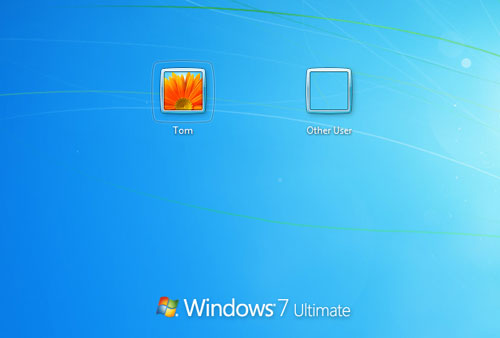
Here we’ll show you how to fix this problem so you can see a list of users at the login screen. This method will also prevent Windows from automatically logging in to the last user account.
How to Fix Windows Login Screen Showing Only Last Logged-on User?
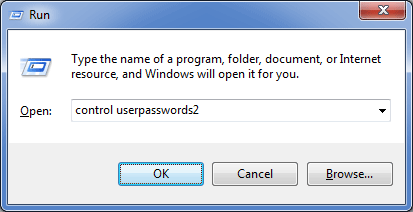
Press Windows + R key combination to bring up the Run box. type netplwiz and press Enter. If this isn’t functioning, type control userpasswords2. This will take you to the same place.
Once in the user accounts window, check the box labeled “Users must enter a user name and password to use this computer”.
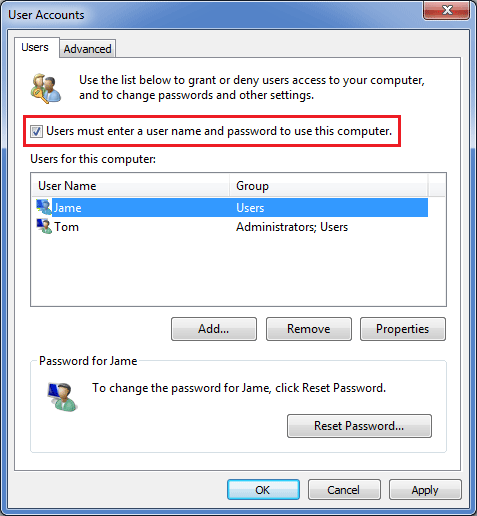
Click OK. Restart your computer and see if the login screen is now back to normal again with all user icons displayed.
Note: You must be logged in as an administrator to be able to do the steps in this tutorial. If you can’t remember the administrator password, you can reset it using PCUnlocker Live CD or USB drive.