I have a Dell laptop running Windows 7 with only one administrator and a standard user account. Today my administrator account won’t load and I get the message “The User Profile Service failed the logon. User profile cannot be loaded”. Is there any way to promote the existing standard user account to administrator so I can regain access to the files under the corrupted admin account?
Can’t log in to Windows because your administrator account has become corrupted? As long as you can still login using a standard user account, you can promote your standard user account to administrator and regain administrative privileges on your computer. This is much easier than fixing a corrupted administrator account.
How to Promote A Standard User Account to Administrator without Logging in to Windows?
First of all, we need to create a PCUnlocker Live CD using another computer. Download the ISO image of PCUnlocker and burn it to a blank CD using ISO2Disc program. If your computer doesn’t come with a CD burner, you could also create a PCUnlocker Live USB drive instead.
Boot your target computer from PCUnlocker Live CD (you might have to adjust the BIOS to allow booting from the CD). When the PCUnlocker program launches, it displays a list of local user accounts on the screen.
Choose a standard user account and click on “Reset Password” button. You’ll be prompted to confirm your operation as shown below.
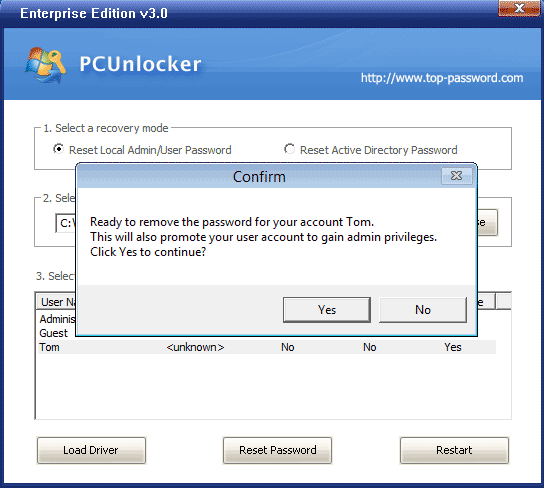
Click Yes to continue. The program will remove your current password and promote your account to administrator quickly.
Restart the computer and remove the PCUnlocker Live CD. You can then log in to Windows with a blank password. After getting into Windows, you can perform any administrative task as usual become you’ve successfully promoted the existing standard user account to administrator.