I have forgotten my password to log into windows 7 on my new laptop. I am the only account set up and cannot remember the login….HELP!!!
Losing your Windows 7 password can be very frustrating. Unless you recover your desktop, you may be faced with the prospect of having re-install Windows. Not anymore. There is a number of utilities that will help you reset the password of any account in Windows 7, even the Administrator.
One of the most powerful recovery tools is Reset Windows Password, which is a live disc you can used to remove forgotten admin/user passwords on Windows 8/7/Vista/XP. It also supports both Active Directory password reset on domain controller and Microsoft account password reset on Windows 8. In this post I’ll show you how to reset Windows 7 administrator password in case you forgot the password on Windows 7 login screen.
How to Reset Windows 7 Administrator Password?
You need an alternative computer with CD burner and a blank CD in order to make a bootable Windows 7 password reset disk. To do that download the Reset Windows Password utility, unzip the download file and you’ll get an ISO image. Burn the ISO image to a CD using your favorite CD burning software. If you don’t have a CD burner, let’s say you have a netbook PC, then you can do a Windows 7 password reset USB instead.
After you have created a bootable Windows 7 password reset disk or USB as mentioned above, go and boot the PC you want to reset its password with this reset disk or USB. Once the PC starts to boot, it will load the operating system inside the password reset disk and launch the Reset Windows Password program.
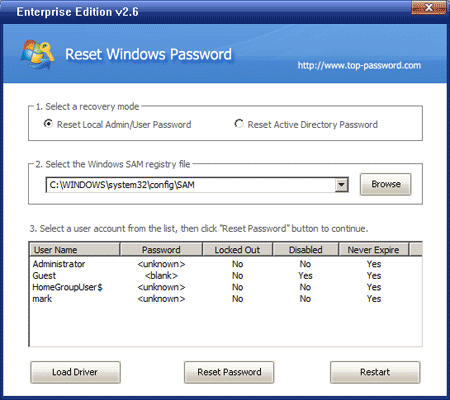
Choose the administrator account and then click on Reset Password button. It will reset your forgotten Windows 7 password and unlock the administrator account in no time.
Now take out the password reset disk and restart the computer. You can then log in to Windows 7 administrator account without being asked for a password. No need to worry about data loss when you forgot password on Windows 7 login screen.