
Provide the best software to recover passwords for
Windows, SQL Server, PDF, Word, Excel, Outlook, FTP, Email, etc.




How to Change Domain Administrator Password
Forgot the Active Directory administrator password and unable to access the Domain Controller? How to reset or change the Domain administrator password?
You can easily reset or change your forgotten Domain administrator password by following the step-by-step guide below. The method works on all version of Windows Active Directory Enabled Servers (2000, 2003, 2008, 2012, etc.).
Requirements:
- In order to boot your domain controller into the Directory Services Restore Mode, you need to use PCUnlocker Live CD to reset Directory Services Restore Mode password firstly.
- Two tools provided by Microsoft in their Resource Kit: srvany.exe and instsrv.exe. Download them from HERE (24kb).
How to Change Domain Administrator Password
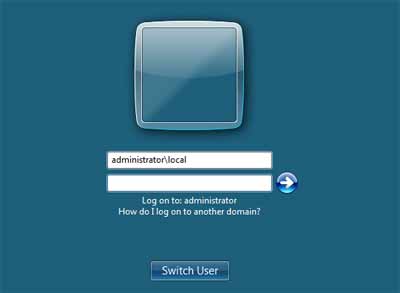
Start the computer and hit F8 to get boot options. Choose the Directory Service Restore Mode option. When the login screen appears, log on as Local Administrator.
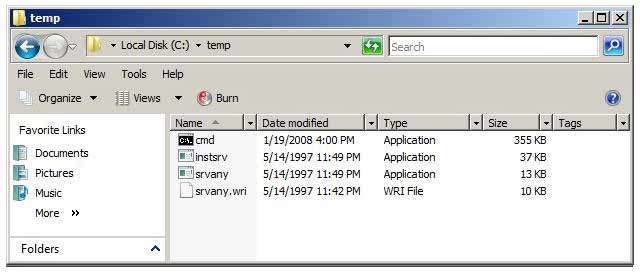
Copy Srvany.exe and Instsrv.exe to a temporary folder, for example C:\temp. Copy cmd.exe to this folder too (cmd.exe is the command prompt, usually located at %WINDIR%\System32).
- Double click the file C:\temp\cmd.exe to open a command prompt, then type: instsrv PWRESET "C:\temp\srvany.exe".
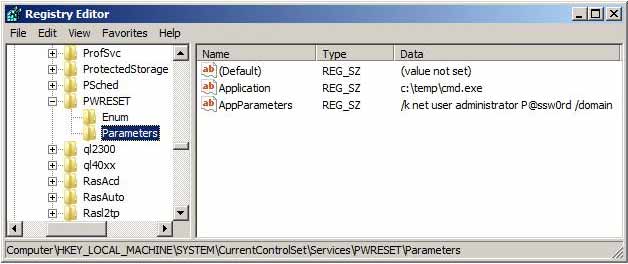
- Open the Registry Editor (Regedit.exe) and navigate to
HKEY_LOCAL_MACHINE\System\CurrentControlSet\Services\PWRESET
- Create a new subkey and name it "Parameters" and add the following values.
name: Application
type: REG_SZ (string)
value: c:\temp\cmd.exe

name: AppParameters
type: REG_SZ (string)
value: /k net user administrator P@ssw0rd /domain
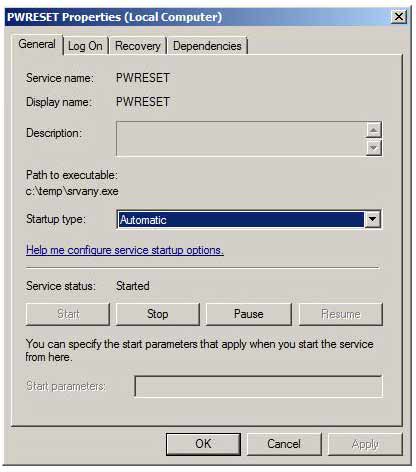
Now open the Services applet (Control Panel -> Administrative Tools -> Services) and find the PWRESET service, make sure the Startup Type is set to Automatic and then click on the Log On tab and make sure the Allow Service to Interact with Desktop is checked.
- Restart Windows normally, when the login dialog appears type in user: Administrator and password: P@ssw0rd and you should be in the server.
- Open a command prompt to delete the PWRESET service by typing:
net stop PWRESET
sc delete PWRESET
- Now you are in the domain controller with access as administrator.
If you're out of luck with the trick above, or need an easier solution, you can use PCUnlocker program to reset forgotten domain administrator password for Windows 2000 / 2003 / 2008 / 2012 Active Directory servers.
Ready to try or buy?
Related Articles


