Forgot your Microsoft account and get locked out of your Windows 8 system? How can you bypass the Microsoft account login? If you are logging in to Windows 8 using a Microsoft account you should always have an additional local account to use in case your Microsoft login doesn’t work for whatever reason. But in most situations we might find that the Microsoft account is the only user account on our computers when we forgot its password. Luckily, there is a quick way to bypass the Microsoft account password in Windows 8.
How to Bypass the Microsoft Account Password in Windows 8?
- Download PCUnlocker using an alternate PC which you have full access to. Once it’s finished, double-click the zip file to extract it. You will then need to burn the ISO file to a writable CD using a program like ISO2Disc or ImgBurn.
- Insert the CD into the computer that you need to bypass the Microsoft account password on and boot from it. You may have to change the computer’s boot order in the BIOS in order to boot from the CD.
- If you boot from the CD successfully, the computer will load the Windows PE operating system from the CD. When the boot process is complete, you’ll see the PCUnlocker program. It shows you a list of local user accounts which are detected from the Windows SAM registry file.
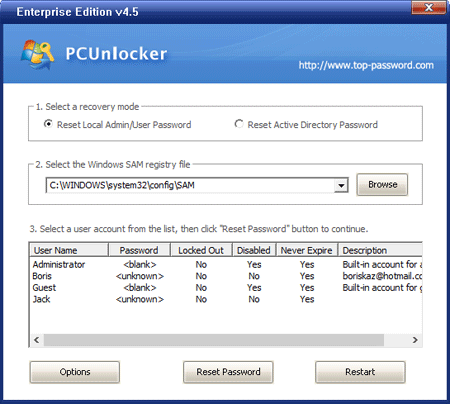
- Choose the local account which is linked to your Microsoft account, and then click on “Reset Password” button. The program will change your Microsoft account login to Password123 by default.
- Restart your computer and take out the CD from the CD drive. If the password reset was successful then you should be able to log into your Windows 8 Microsoft account with new password.
Note that PCUnlocker also works for Windows 8.1. It should be a unique tool for Windows 8 users to bypass the Microsoft account login easily. Save you the trouble of forgetting Windows password in an easy way!