• Home
  • Content
  • RSS
  • Log in

Password Recovery

Provide useful password recovery tricks, guides and software
  • Home
  • Password Recovery Bundle
  • Reset Windows Password
  • Product Key Finder
  • Protect My Folders

How to Setup Windows 8.1 without Microsoft Account

February 25, 2014 updated by Admin Leave a reply »

When you install or upgrade to Windows 8.1, you’ll be forced to create a Microsoft account or use an existing Windows Live account to log on your computer. There is no option to setup a local account during the installation. Microsoft account is now the preferred sign-in type since Windows 8. However, if you insist on using a local account, you’ve come into the right place. In this tutorial we’ll walk you through the steps to setup / install Windows 8.1 without a Microsoft account.

Tips: If you forgot your local or Microsoft account and can’t sign into Windows 8, you can bypass the password with PCUnlocker and regain access to your computer.

How to Setup Windows 8.1 without Microsoft Account?

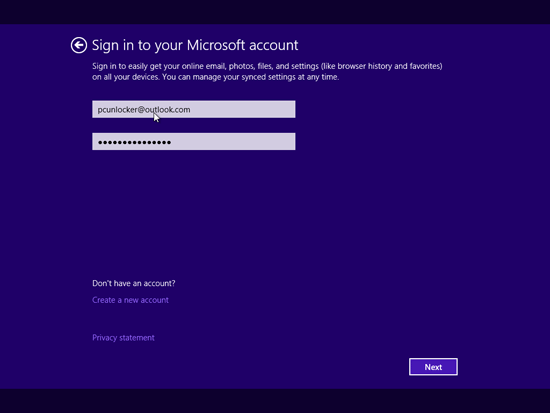
  1. Boot your computer from Windows 8.1 installation DVD or USB drive, and follow the setup wizard until you see the screen where asks for your Microsoft account to continue.
    sign-in-microsoft-account

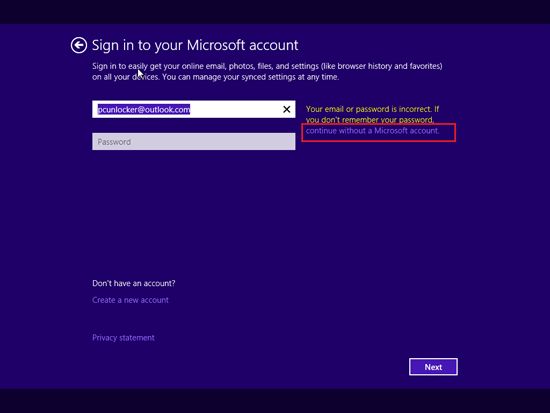
  2. Enter an invalid Windows Live account or an incorrect password like shown in the following screenshot. Click on Next. You’ll get some information that indicates your email/password is not correct.
    continue without microsoft account

  3. Simply click on the lightly-colored link that said “continue without a Microsoft Account”.
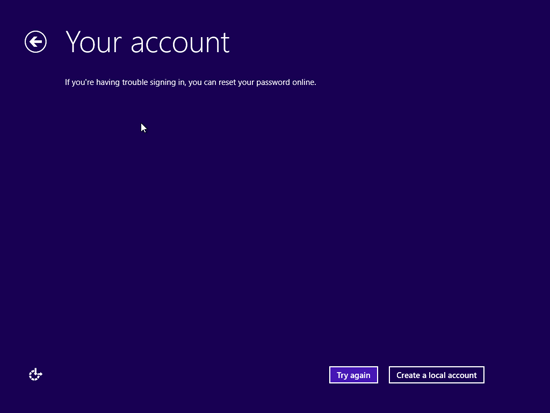
  4. Now we need to press “Create a local account” button.
    create-local-account

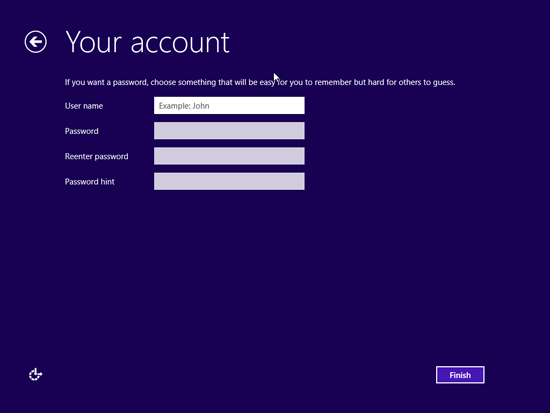
  5. Type your local account name and password and click on “Finish”.
    windows-8.1-local-account

    Proceed to complete the left task of your installation.

Related posts:

  • Install Windows 10 without Microsoft Live Account
  • How Do I Know If I Use A Microsoft Account in Windows 10 / 8
  • Forgot Windows 8 Local Account or Microsoft Account Password
  • How to Install Windows 10 or 8.1 with Local Account (Skip Microsoft Account)

  • Previous Post: How to Recover Windows Password with Cain & Abel
  • Next Post: How to Bypass Windows 7 Login Password from Scratch

Posted in Others, Tips & Tricks, Windows 8

Tags: install windows 8.1 without microsoft account setup windows 8.1 without microsoft account windows 8 without microsoft account windows 8.1 without microsoft account

    • Subscribe Subscribe to my blogs feed
    • Previous Entry How to Recover Windows Password with Cain & Abel
    • Next Entry How to Bypass Windows 7 Login Password from Scratch

Back to Top

© 2025 top-password.com. Proudly powered by WordPress.