Accidentally demoted your administrator account to a standard user and can’t get admin rights on your computer? Forgot the administrator password after setting up Parental Controls for your child’s account? With a standard user you are unable to install any programs. When you try the “net user” command to reset admin password, you’ll get the “access denied” error.
In this article I would like to walk you through using a tool to gain admin access to your Windows system from standard user account. This method works on nearly all versions of Windows, including Windows 8.1.
How to Gain Admin Access to Windows from Standard User Account?
Step 1: First, you need to use another computer to download the zipped ISO image of PCUnlocker. Extract the downloaded file locally and then burn the resulting .iso file to a CD-ROM (or USB flash drive) using ISO2Disc program.
Step 2: Insert the CD into the computer that you’re trying to gain admin access to and boot from it. You may have to change the computer’s boot order in the BIOS in order to boot from the CD.
Step 3: If you boot from the CD successfully, the computer will load the contents of the CD drive, and eventually start the PCUnlocker program. This program automatically detects your Windows installation and displays all Windows user accounts which are stored in the SAM registry hive.
Step 4: Choose your standard user account and click on “Reset Password” button. You will get a confirmation dialog like the one shown below:
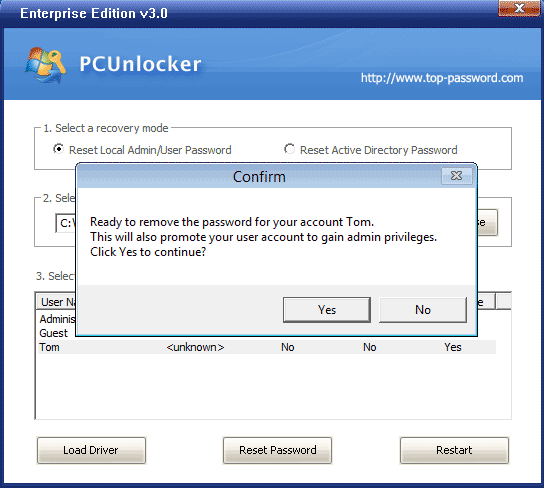
Step 5: Click Yes to continue. The program will remove your current password and promote your standard user account to administrator immediately.
Step 6: Now everything finish properly and you have to remove the CD and restart your machine. After logging into your standard user account, you’ll find that your user account has already been joined into the administrators group. Now you’ve successfully gained admin access to your system and you can perform any administrative tasks on your computer.