After installing updates I can no longer login to Windows 7. I get an error that either the login or password is incorrect. I don’t believe I am mistyping the password. Any help would be greatly appreciated.
Can’t login to Windows 7 after Windows update? This may be the weirdest issue we’ve heard of. But it really happens on some computers. To troubleshot this problem, you can restore your computer to a restore point which you created prior to the updates. Another option is to reset the login password on your Windows 7 system. In this article we’ll show you how to remove Windows 7 password so you can log back into Windows 7 without any hassle.
Can’t Login to Windows 7? How to Remove the Password?
- Download the CD-ISO ZIP file of Reset Windows Password utility and extract it to get the ISO file. Burn the ISO file to a CD/DVD using a CD/DVD recording software such as ISO2Disc.
- Before inserting the CD/DVD to your locked Windows 7 computer, make sure that you have made necessary changes to boot priority setting in the BIOS so that you can boot from CD/DVD. Insert the CD/DVD into the optical drive and restart your machine. In a few seconds you will see the Reset Windows Password program.
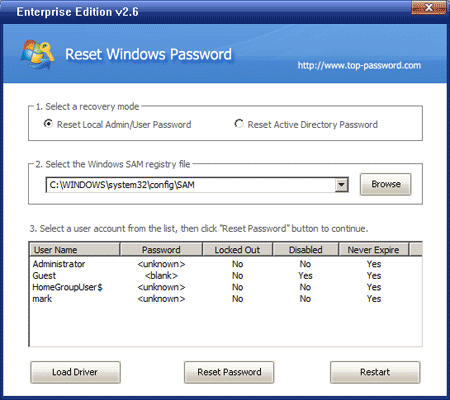
- You should see the user accounts existing in your Windows SAM registry hive. Choose your desired user account and then click on Reset Password button, the program will remove your login password instantly.
Take out the CD/DVD and restart the computer. You can then login to Windows 7 without being required to type a password. This method is widely used to remove Windows login passwords for people who forgot their passwords, but it’s also a good option to resolve the problem of “can’t login to Windows 7 after Windows update”.