How do I stop OneDrive from opening at startup? By default, OneDrive is set to start automatically when you sign in to Windows 10. However, OneDrive will sync the files in the background and this can waster your limited bandwidth. In this tutorial we’ll show you 2 simple ways to stop OneDrive from automatically starting at startup in Windows 10.
Method 1: Stop OneDrive from Starting at Startup via OneDrive Settings
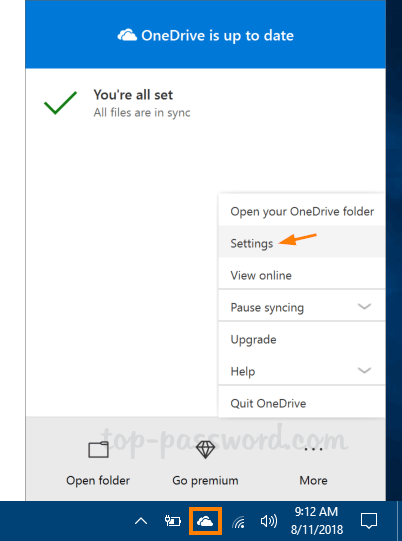
Right-click on the OneDrive icon in the taskbar notification area, and then click Settings.
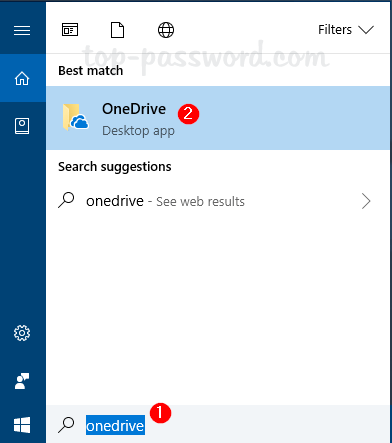
If the OneDrive icon is missing from the taskbar, just click the Cortana Search box and type OneDrive. Click the app from the search result and the OneDrive icon will appear in the taskbar.
Under the Settings tab, uncheck the “Start OneDrive automatically when I sign in to Windows” box and click OK.
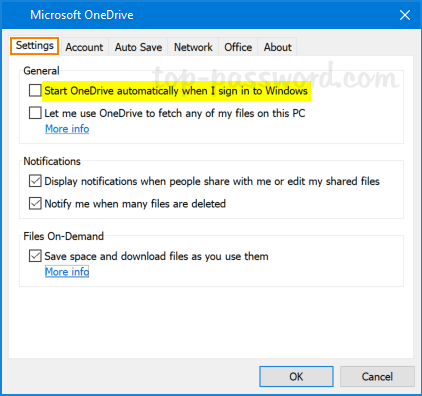
Now, OneDrive should not start automatically every time your computer restarts.
Method 2: Stop OneDrive from Starting at Startup via Registry Trick
Open the Command Prompt. Run the following command to make a little change with the registry:
reg delete "HKCU\Software\Microsoft\Windows\CurrentVersion\Run" /f /v "OneDrive"
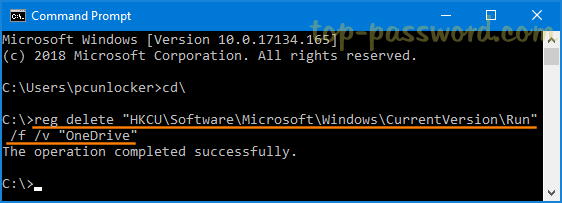
This will stop OneDrive from automatically starts when you sign in to Windows next time.
If you want to enable OneDrive to automatically start at startup, then run this command instead:
reg add "HKCU\Software\Microsoft\Windows\CurrentVersion\Run" /f /v "OneDrive" /t REG_SZ /d "\"%LOCALAPPDATA%\Microsoft\OneDrive\OneDrive.exe\" /background"
That’s it!