• Home
  • Content
  • RSS
  • Log in

Password Recovery

Provide useful password recovery tricks, guides and software
  • Home
  • Password Recovery Bundle
  • Reset Windows Password
  • Product Key Finder
  • Protect My Folders

How to Enable Hidden Administrator Accounts in Windows 7 and Vista

June 22, 2012 updated by Admin Leave a reply »

There is a hidden account for Administrator in Windows 7 and Vista. Some software require this administrator account so as to run, install or uninstall. Let us see how to enable the hidden administrator account in Windows 7 and Vista.

  1. Click Start button or Windows key.
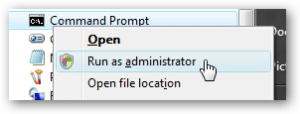
  2. Right click on Command Prompt and click on Run as administrator.
Type the below command in the Command Prompt:

c:\> net user administrator /active:yes

Log off from that user account or restart the system and now you can see the hidden administrator account in the Windows logon screen. If you want to disable that account just execute this command at the Command Prompt:

c:\> net user administrator /active:no

If you forgot Windows login password on Windows 7/Vista/XP, you can use Password Recovery Bundle to reset lost administrator/user passwords, unlock any Windows account which is disabled or locked out.

Related posts:

  • How to Enable or Activate Windows Administrator Account without Logging In
  • 2 Options to Create a Hidden Administrator Account in Windows
  • How to Enable / Disable Hidden Administrator Account in Windows 8/7/Vista
  • How to Enable the Hidden Guest Account in Windows 10

  • Previous Post: How to Show My Computer Icon on Windows 8 Desktop
  • Next Post: How to Reset Windows Server 2008 Password

Posted in Others, Tips & Tricks, Windows 7, Windows Vista

Tags: enable windows administrator account windows hidden administrator account

    • Subscribe Subscribe to my blogs feed
    • Previous Entry How to Show My Computer Icon on Windows 8 Desktop
    • Next Entry How to Reset Windows Server 2008 Password

Back to Top

© 2025 top-password.com. Proudly powered by WordPress.