What can I do if I forgot my Windows 7 password? I was the administrator for the Windows 7 computer with that account. Is there a way to reset it or let me logon without reinstalling?
It might happen that you forgot the administrator password of your Windows 7 computer and you are unable to use it then. Password cannot be recovered but there is a way to reset your password provided you have a PCUnlocker boot CD/USB drive to deal with such situation. If you don’t have one, you can still create one on another PC you have access to.
Forgot My Windows 7 Password? How to Reset It?
- Download the zipped ISO image of PCUnlocker on an alternate PC you can log on. Unzip the download file and you’ll see a bootable ISO image file: pcunlocker.iso, which need to be burned on to a CD (or USB flash drive) using ISO2Disc program.
- After you’ve created a PCUnlocker boot CD, connect it to your locked computer that you want to reset lost Windows 7 password on. When the computer is booting, you will need to press the correct key to get into the Boot Menu. It is usually F12 or Del key. Once in the Boot Menu, select the CD/DVD-ROM Drive that you just created and press Enter.
- Now comes the easy part. Just sit back and wait for the computer to load the WinPE operating system which is installed on the PCUnlocker boot CD. After about half a minute, you’ll see the PCUnlocker program which displays a list of local user accounts that are detected on your Windows 7 computer.
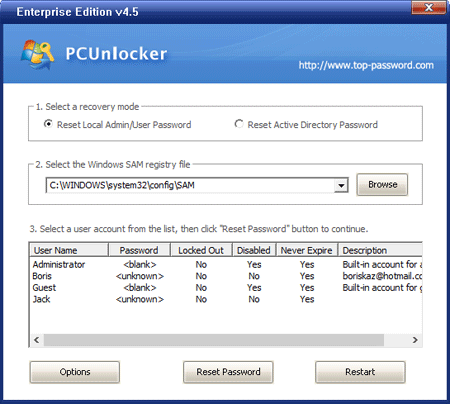
- Choose the administrator account and click on Reset Password button. The program will reset your forgotten Windows 7 administrator password, and also tweak your account’s settings in case the administrator account is locked out, disabled or expired.
- Restart the computer and remove the boot CD. Now you can log back into your Windows 7 administrator account with a blank/empty password.
If you forgot Windows 7 administrator password then the whole system will get locked and you are not able to perform any task on the system. In that situation PCUnlocker will come into rescue. Boot your computer from PCUnlocker CD/USB drive and you can reset your forgotten Windows 7 password easily!