One of the changes in Windows 8 that draws the most attention is the sign-in options. Windows 8 allows you to log on using Microsoft account, four-digit PIN and picture password, as alternate sign-in options for conventional text password. However, I discover that the Account Lockout policy is not working for the new sign-in options.
I set the number of logon attempts before locking the system, and specify the Account Lockout duration using the Local Security Policy Editor in Windows 8.
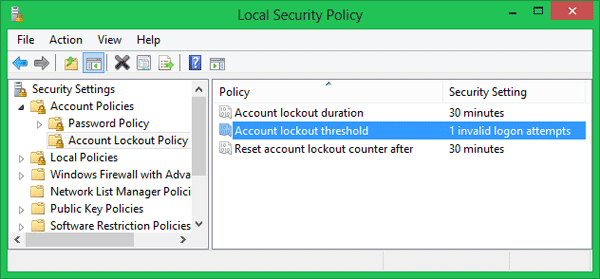
After enabling the account lockout policy, restart the system. When it boots to the Windows 8 logon screen, I try several wrong passwords with my Microsoft account intentionally, Windows keeps saying password is incorrect but never lock my Microsoft account, and I can then immediately log into the system using a correct password. The same thing happens with PIN code and picture password.
I think this is a great security hole or bug with Windows 8 operating system. Account Lockout policy is designed to disable a user account if an incorrect password is entered a specified number of times over a specified period. It help you to prevent attackers from guessing users’ passwords, and they decrease the likelihood of successful attacks on your network.
So I think it’s more secure to use a traditional text password than using the new sign-in options: Microsoft account, four-digit PIN and picture password.