The SA account is disabled and cannot login to SQL Server? When trying to connect, you may receive the error message “Login failed for user ‘sa’. Reason: The account is disabled. (Microsoft SQL Server, Error: 18470)”.
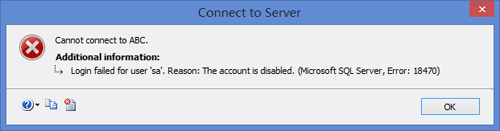
If the SA account is the only login with sysadmin role on your SQL Server, you’ll lose control over the database. Is there a way to enable the disabled SA account without reinstalling SQL Server? Luckily there is a software which can enable any disabled account on SQL Server 2014, 2012, 2008 and 2005. With SQL Server Password Changer you can enable the disabled SA account in just a few mouse clicks!
How to Enable The Disabled SA Account Offline?
First of all, you need to stop your SQL Server instance from SQL Server Configuration Manager. Download and install the SQL Server Password Changer application on your local machine.
Start the SQL Server Password Changer program. Click on Open File button and you’ll see the File Open dialog box. It requires you to select the master database (master.mdf) for your SQL Server instance. SQL Server stores the login credentials in the master.mdf file which resides in the following folder:
C:\Program Files\Microsoft SQL Server\MSSQL10\MSSQL\DATA.
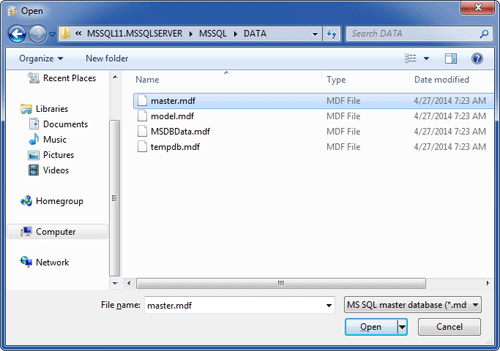
After you’ve chosen the master database file, the program will analyze the file format and extract all database users from it. Choose the SA account and click on Change Password button. In the pop-up window, enter your desired new password and click OK.
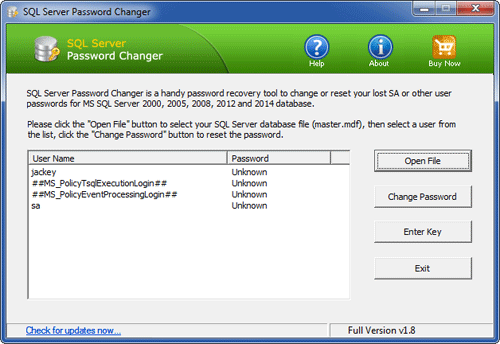
The program will assign your new password to the SA account, and also enable / unlock the SA account when it is disabled or locked out. Start your SQL Server instance and you can then successfully connect to your SA account from SQL Server Management Studio. Enjoy it!