• Home
  • Content
  • RSS
  • Log in

Password Recovery

Provide useful password recovery tricks, guides and software
  • Home
  • Password Recovery Bundle
  • Reset Windows Password
  • Product Key Finder
  • Protect My Folders

Fix: Duplicate User Names on Windows 10 Login Screen

February 4, 2019 updated by Admin Leave a reply »

Windows 10 sign-in screen shows the same user account twice? This issue usually happens to users who have turned on automatic login feature in Windows 10, but changed the login password or computer name afterwards. To fix the issue “Duplicate user names on Windows 10 login screen”, you have to set up auto-login again or disable it.
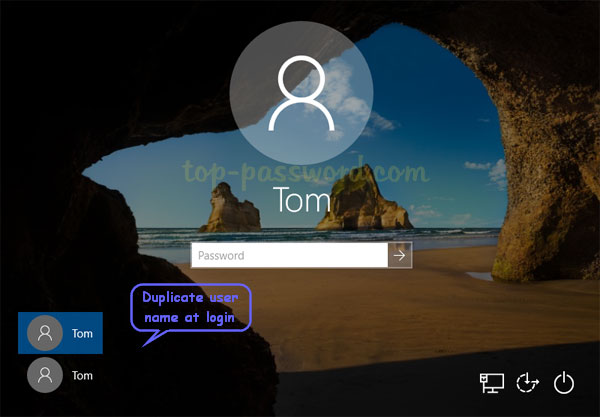
How to Fix: Duplicate User Names on Windows 10 Login Screen

  1. Press the Windows key + R to bring up the Run box. Type netplwiz and hit Enter.

  2. Check the “Users must enter a user name and password to use this computer” box to disable auto-login. If you want to set up auto-login again, uncheck that box and click OK to type the correct password.
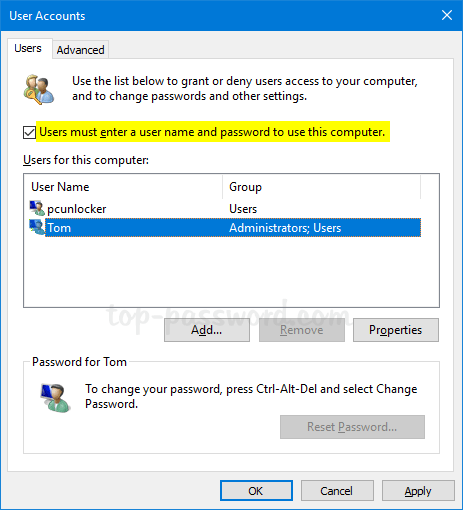
  3. Now, reboot your computer and the issue “Duplicate user names on Windows 10 login screen” should have been fixed.

If you are still seeing duplicate user accounts on the login screen, it is possible that you may have added the same account twice. In that case, you can delete the duplicate account by following this tutorial: 5 Ways to Delete A Local Account in Windows 10.

Related posts:

  • How to Automatically Bypass Windows 10 Login Screen
  • Hide User Account from Welcome Screen in Windows 8/7/Vista/XP
  • How to Fix Windows Login Screen Showing Only Last Logged-on User
  • Make Windows 10/8 Show All User Accounts on Login Screen

  • Previous Post: 4 Ways to Find Number of Cores in your CPU on Windows 10
  • Next Post: 3 Methods to Suspend or Resume BitLocker Protection in Windows 10

Posted in Others, Tips & Tricks, Windows 10

Tags: windows 10 duplicate user on sign-in page windows 10 login screen shows same user twice

    • Subscribe Subscribe to my blogs feed
    • Previous Entry 4 Ways to Find Number of Cores in your CPU on Windows 10
    • Next Entry 3 Methods to Suspend or Resume BitLocker Protection in Windows 10

Back to Top

© 2025 top-password.com. Proudly powered by WordPress.