How to make Windows 7 show user list on login screen and not just the last logged on user? Is there a way to display all user accounts at login screen? In this tutorial we’ll show you how to make Windows 7 show all users at logon screen using a registry trick.
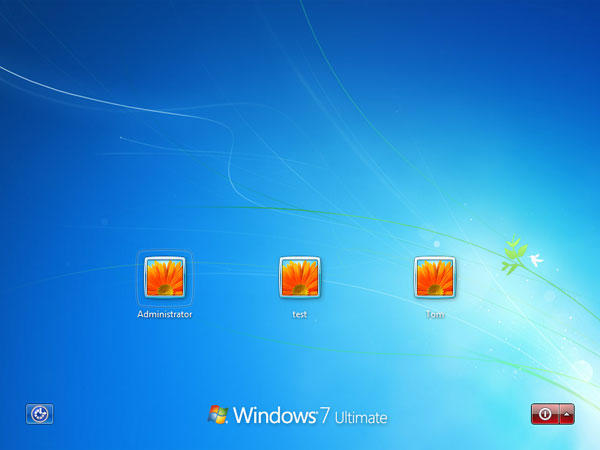
How to Make Windows 7 Show All Users at Logon Screen?
If there is no any user displayed at the login screen, you have to disable the policy “Interactive logon: Do not display last user name“ firstly. In order to make Windows 7 show a list of users at logon screen, please follow these steps to fix the profile issues:
- Press the Windows key + R to open the Run box. Type regedit and press Enter.
- In the Registry Editor, navigate to the following registry path:
HKEY_LOCAL_MACHINE\SOFTWARE\Microsoft\Windows NT\CurrentVersion\ProfileList - If you have a .DEFAULT key in the left pane as a subkey under the ProfileList key, then right-click on .DEFAULT, and click Delete.
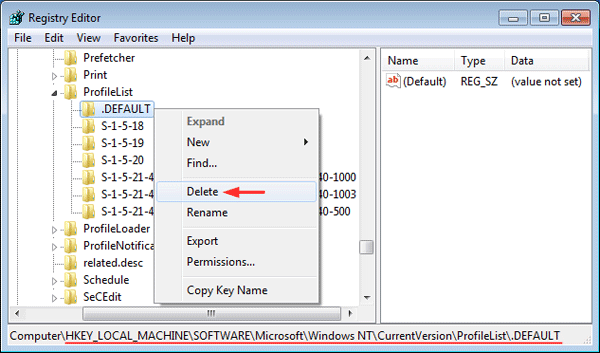
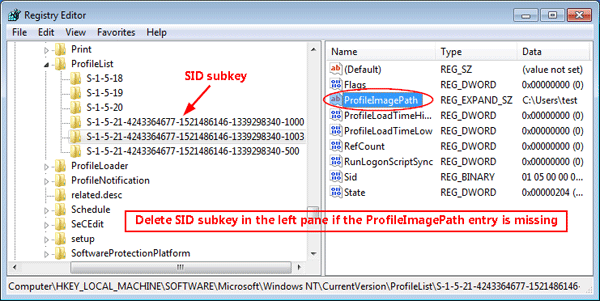
- Under the ProfileList key, all subkeys are named with the SID (like “S-1-5-xx“) of a local/system account. You need to select and look at each SID subkey one at a time.
- Click on the SID subkey in the left pane. If it doesn’t contain an entry named ProfileImagePath in the right pane, it’s a broken profile and you need to delete the SID subkey. Right-click that SID subkey in the left pane, and select Delete.
- Close the Registry Editor. Log off or restart your computer. The welcome/login screen should now work as expected, showing the avatar for all users. Enjoy!