• Home
  • Content
  • RSS
  • Log in

Password Recovery

Provide useful password recovery tricks, guides and software
  • Home
  • Password Recovery Bundle
  • Reset Windows Password
  • Product Key Finder
  • Protect My Folders

Install Windows 10 without Microsoft Live Account

August 3, 2015 updated by Admin Leave a reply »

Windows 10 was released to public last Wednesday and it is available as a free download. However, when setting up Windows 10, you’re given an option to use only Windows Live account as your computer’s login. There is no straight-forward way to set up a local account. In this article we’ll show you how to install Windows 10 without Microsoft Live account.

How to Install Windows 10 without Microsoft Live Account?

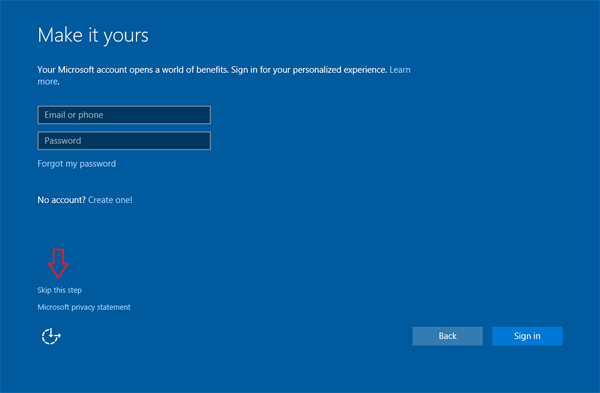
  1. Install Windows 10 as you would usually do. When the installation comes to the part of prompting you to sign in with Microsoft account, click on the “Skip this step” link.
    install-win10-without-live-account

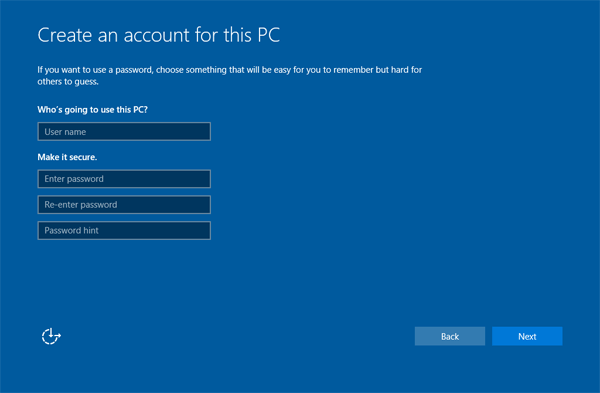
  2. In the next screen, it allows you to create a local account. Just enter in the name of your local account, password, and password hint. The account you create here will be used to log on to the machine locally without Microsoft online account.
    create-win10-local-account

  3. This is how you now create local account during Windows 10 installation. That’s it! Hope this helps.

Related posts:

  • How to Setup Windows 8.1 without Microsoft Account
  • How to Install Windows 10 or 8.1 with Local Account (Skip Microsoft Account)
  • Can’t Login to Windows 8 with Live Account Password
  • Forgot Windows 10 Online / Live Account Password? Try This

  • Previous Post: How to Create A Windows To Go USB Drive in Windows 8 Enterprise
  • Next Post: Fix Boot Failure: a proper digital signature was not found

Posted in Tips & Tricks, Windows 10

Tags: install windows 10 with local account install windows 10 without microsoft account windows 10 setup without microsoft account

    • Subscribe Subscribe to my blogs feed
    • Previous Entry How to Create A Windows To Go USB Drive in Windows 8 Enterprise
    • Next Entry Fix Boot Failure: a proper digital signature was not found

Back to Top

© 2025 top-password.com. Proudly powered by WordPress.