If you’ve lost your Windows account password, hopefully you had the foresight to create a password reset disc. Windows XP provides the option of creating a password reset disc to unlock lost accounts, but you need access to your account to do so. What to do if you forgot Windows login password and don’t have password reset disc?
In this tutorial we’ll show you the most efficient and easiest way to unlock Windows XP login password using a password unlocker boot CD. Just create such a boot CD in another computer, then boot your locked Windows XP computer from the CD and you can remove your forgotten login password easily.
How to Unlock Windows XP Login Password?
1. Before getting started, you need to prepare a password unlocker boot CD. Just download the Reset Windows Password software onto an alternative computer. Once the download is complete, unzip the download file and you’ll get the ResetWindowsPwd.iso file. Burn this ISO image to a blank CD using any CD recording program such as BurnCDCC.
2. Power on your locked Windows XP computer and boot it into BIOS. Change the boot order so the computer will boot from CD prior to hard drive. Once the boot order is configured correctly, insert the password unlocker boot CD into the computer. It will load the operating system inside the CD.
3. After a while, the system will fire up the Reset Windows Password program. It automatically detects the SAM registry hive on your computer and shows a list of Windows user accounts.
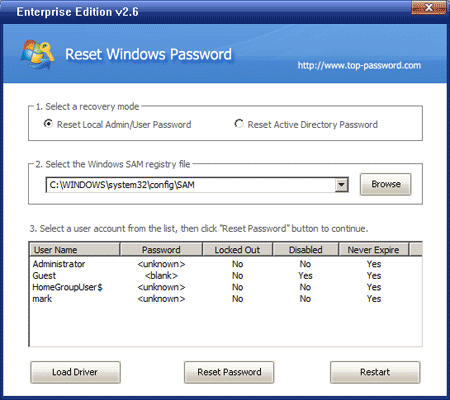
4. Choose a user account whose password needs to be unlocked, and click on Reset Password button. The program will remove the user login password in a matter of seconds.
Restart the computer and take out the password unlocker boot CD, the computer will start normally from your hard drive. You can then log in Windows XP system without being required to enter a login password. Done!