• Home
  • Content
  • RSS
  • Log in

Password Recovery

Provide useful password recovery tricks, guides and software
  • Home
  • Password Recovery Bundle
  • Reset Windows Password
  • Product Key Finder
  • Protect My Folders

How to Automatically Bypass Windows 10 Login Screen

November 17, 2015 updated by Admin Leave a reply »

How to boot straight to Windows desktop by skipping the login screen? Want to avoid typing your password each time you turn on your PC? By default, Windows 10 shows the logon screen which lists all the user accounts, and you have to select an account and type your password to login. If you are the sole user of your computer and security isn’t a big concern, configuring Windows 10 to log on to your specific account automatically can save you some serious time when your computer is starting up.

Note: The steps below require you to log in as Administrator. If you’ve forgotten the password and couldn’t login, you need to bypass Windows 10 password firstly.

How to Automatically Bypass Windows 10 Login Screen?

Press the Windows logo key + R together to open the Run box. Type netplwiz and then press Enter.
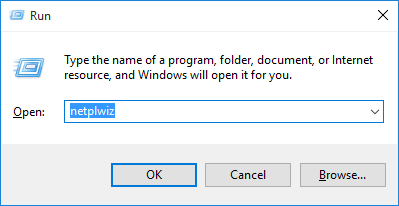
netplwiz

In the resulting User Accounts dialog, click on the account for which you want to log in automatically. Then uncheck the Users must enter a username and password to use this computer option.
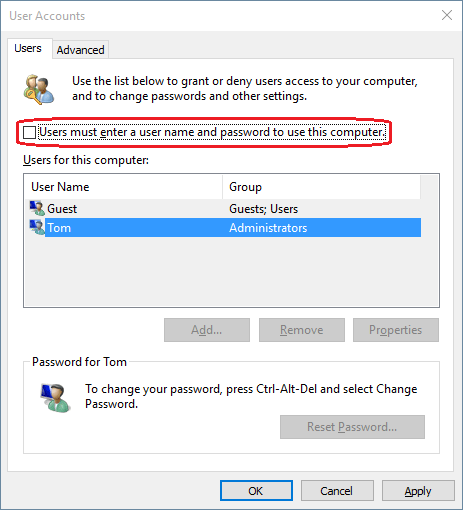
windows-auto-login

Click OK, and you’ll be asked to provide the password for the account. Once you’ve entered that, click OK.
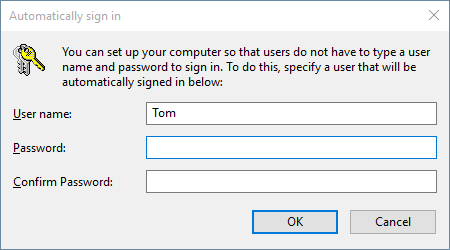
automatically-sign-in

That’s it. Once you restart your computer, you’ll be automatically logged into your chosen account. Simple!

Related posts:

  • How to Bypass Windows Login Password
  • How to Bypass Windows 7/Vista/XP Login Screen
  • Bypass Windows 8 Login Screen on Wake up from Sleep
  • Login to Windows 8 Microsoft Account Automatically without Password

  • Previous Post: 2 Ways to Set Password Hint for Windows User Account
  • Next Post: How to Upgrade to Windows 10 without Using Windows Update

Posted in Tips & Tricks, Windows 10

Tags: automatically log in to windows 10 bypass login screen in windows 10 bypass logon screen in windows 10 bypass windows 10 login skip windows 10 login screen windows 10 automatic login

    • Subscribe Subscribe to my blogs feed
    • Previous Entry 2 Ways to Set Password Hint for Windows User Account
    • Next Entry How to Upgrade to Windows 10 without Using Windows Update

Back to Top

© 2025 top-password.com. Proudly powered by WordPress.