I am wondering if anyone else has experienced this problem. Every time I change the domain administrator password and then try to log in, I always get the “Your account has been locked out” message. Is there a way to determine why my domain account keeps getting locked out?
Domain account keeps getting locked out after password change? It is likely that some services or applications are still using the old password to connect to the domain resources. The domain account will be locked out due to reaching its account lockout threshold of invalid login attempts.
Browsing the security event log files and the Netlogon log files, it would be helpful for you to determine where the lockouts are occurring and why. Here are some common causes for account locked-out:
- Programs or Services: Many applications are still using the cached password to connect to the domain without updating the password.
- Stored User Names and Passwords: I recommend you to launch the Stored User Names and Passwords tool and remove all the saved passwords. You can launch this tool by clicking on Start and executing the following command in the Run box:
rundll32.exe keymgr.dll,KRShowKeyMgr - Scheduled tasks: Scheduled processes may be configured to using passwords that have expired.
- Disconnected Terminal Server sessions: Disconnected Terminal Server sessions may be running a process that accesses network resources with outdated authentication information. A disconnected session can have the same effect as a user with multiple interactive logons and cause account lockout by using the outdated credentials.
If your domain account is locked out and you can’t log on with other administrator account, you need to unlock the user account before finding out the locked-out reasons. Here are steps for you to unlock a domain user account:
- Download Password Recovery Bundle and save it on any accessible computer. Install and launch Password Recovery Bundle, then click Windows Password button, the pop-up dialog enables you to create a password reset CD.
- To make your locked computer boot off the password reset disk, head over to the computer’s BIOS and make some changes: Set CD-ROM as the 1st boot device.
- Insert the password reset disk you’ve created into your locked computer. Restart the computer. You’ll notice the boot screen is not the same as usual because it is loading from the password reset disk now.
- It takes a while to load some necessary files and launch the Reset Windows Password utility. Here we’re going to unlock Windows Domain password, so we choose the Reset Active Directory Password option. It will display a list of domain user accounts on your domain controller.
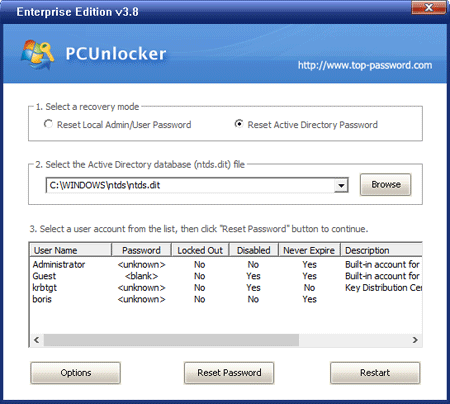
- Choose a locked-out domain user account, then click Reset Password button. The program will change its password to Password123 by default, also unlock this account if it is locked out.
- You can then log in to your domain user account.