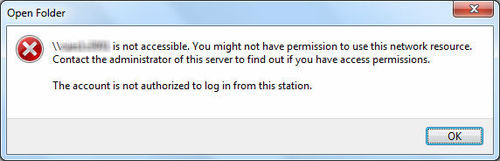
When I try to access a shared folder at a network server using a Windows 7 computer, I got the following error message:
\\Computer_Name is not accessible. You might not have permission to use this network resource. Contact the administrator of this server to find out if you have access permissions.
The account is not authorized to log in from this station.
However, I have no problem accessing the same file share using any other PCs on the LAN. So there must be something on the Windows 7 that caused the problem. After some troubleshooting, I have found a registry fix to this issue. Here’s how:
- Press the Windows key + R to bring up the Run box, then type regedit and hit Enter. This will open the Registry Editor.
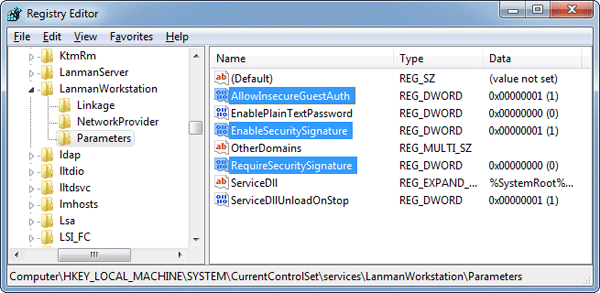
- Navigate to the following registry key:
HKEY_LOCAL_MACHINE\SYSTEM\CurrentControlSet\Services\lanmanworkstation\parametersIn the right pane of Registry Editor, change the value of requiresecuritysignature to 0, and set enablesecuritysignature to 1. Right-click on empty space and select New and then DWORD (32-bit) value. Name it as AllowInsecureGuestAuth and set its value data to 1.
- Navigate to this registry key:
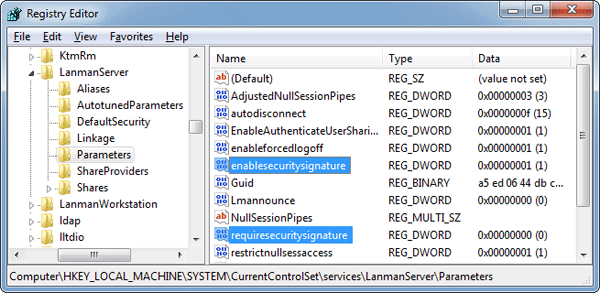
HKEY_LOCAL_MACHINE\SYSTEM\CurrentControlSet\Services\lanmanserver\parametersAlso change the value of requiresecuritysignature to 0, and set enablesecuritysignature to 1.
- Close the Registry Editor. Reboot the computer for the change to take effect. After restarting, the problem should be fixed.